
Private · On device · iPhone, iPad, Mac & Apple Watch
Know yourself.
Keep it to yourself.
Candor is a journal for the parts of your life you don't hand to a server. Log activity, follow your PrEP and DoxyPEP routine, keep your STI results and vaccinations in one place, and write things down only you will read.
14 days free, then US$19.99 / year · Cancel anytime · Ages 18+
- Storage
- On device
- Sync
- Your iCloud, optional
- Accounts
- None
- Tracking
- Zero
What it does
A journal, not a social app.
No feed, no profiles, nobody to compare yourself to. Log what happened, keep your health routine on track, and see your own patterns.
Calendar & entries
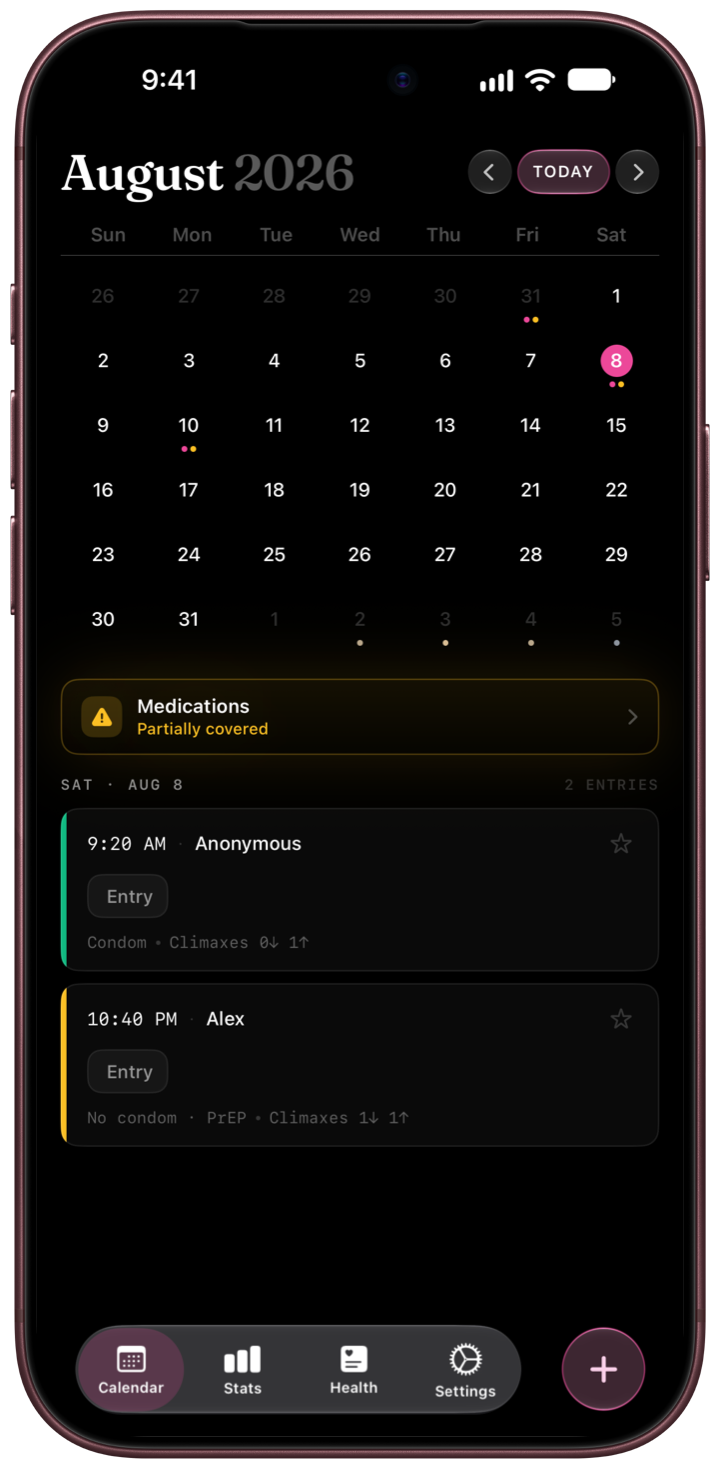
Your month at a glance. Tap a day to see what happened or add an entry in seconds — four entry modes, from a one-tap counter to a full detailed record.
PrEP, DoxyPEP & DoxyPrEP
Local reminders for daily PrEP, event-based 2-1-1, the DoxyPEP 72-hour window and DoxyPrEP dosing — with per-cycle adherence you can actually read.
STI test history
Log panels, sites and results. Set a test-cycle reminder, keep a timeline of every visit, and know your last test date without digging through email.
Stats & Streaks
Lifetime, yearly and monthly counts. Roles, practices, day-of-week patterns, adherence rates and Streaks sessions — numbers for you, not a leaderboard.
Partners
Anonymous by default. Add a name only if you want one, see per-partner history, or keep every entry unattributed. After a positive test, prepare a message for a partner — or record an exposure a partner tells you about.
Reflections
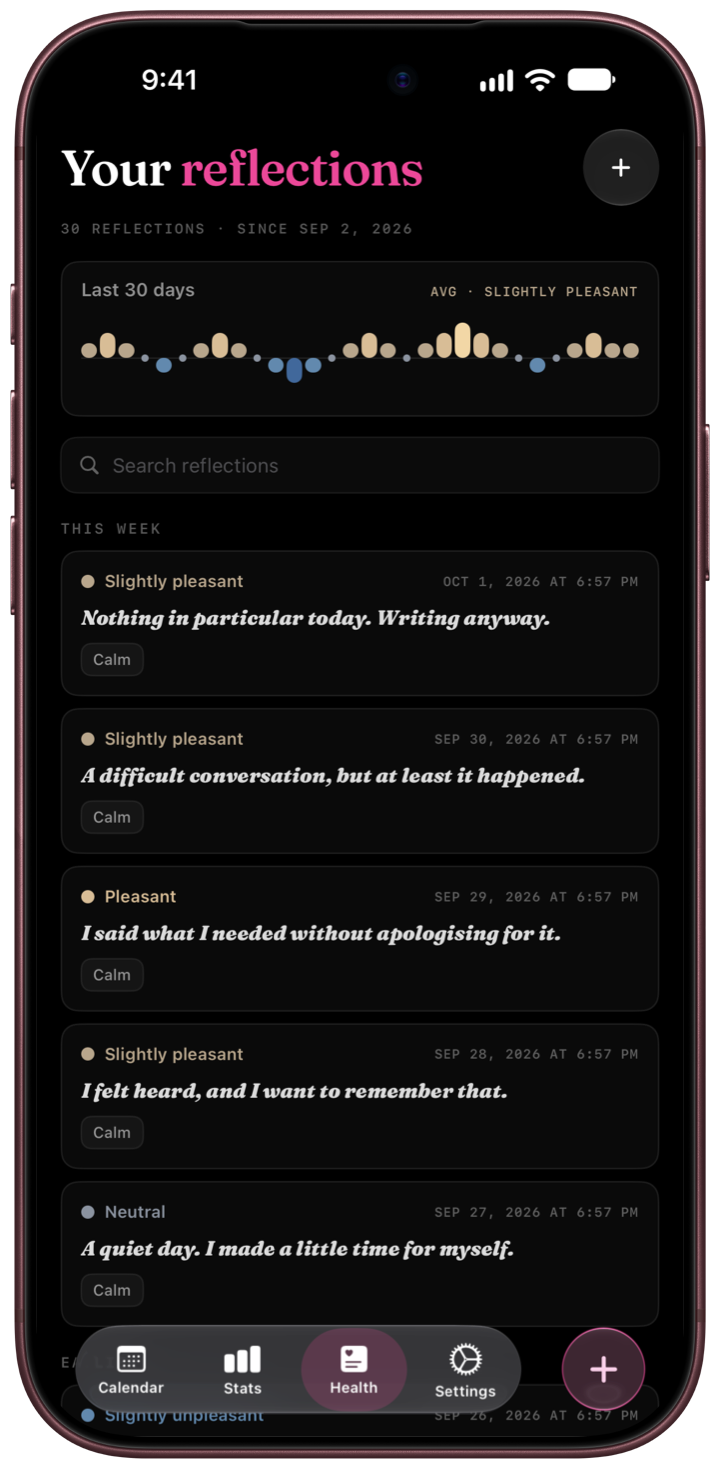
A short private note and a mood rating, whenever you want one. Prompts if you need a starting point, silence if you don't. Nothing is scored.
Vaccinations & PEP
Doses and boosters with reminders, and PEP courses with a dose log and the follow-up tests that come after — next to your medication and test history.
Export & backup
CSV files for your own analysis, a PDF report to share with your clinician, and a full backup you can protect with a password and restore later. Only when you ask for it.
Widgets & shortcuts
Home and Lock Screen widgets, Control Center controls, Siri and Shortcuts, optional Live Activities — and mark a dose as taken right from its reminder.
Calendar
Open the app, see your month.
Days with activity carry a small marker. Tap any date to read what happened, or add a new entry without leaving the screen.
- Four entry modes — Counter, Quick, Standard and Detailed. Pick your default; switch per entry.
- Only the fields you want — practices, role, protection, partner, venue, rating, tags and notes are all optional.
- Editable forever — change or delete any entry, any time, with no history left behind.
- Import what you already have — bring in an existing log in one batch, with a 24-hour undo.
Health tab
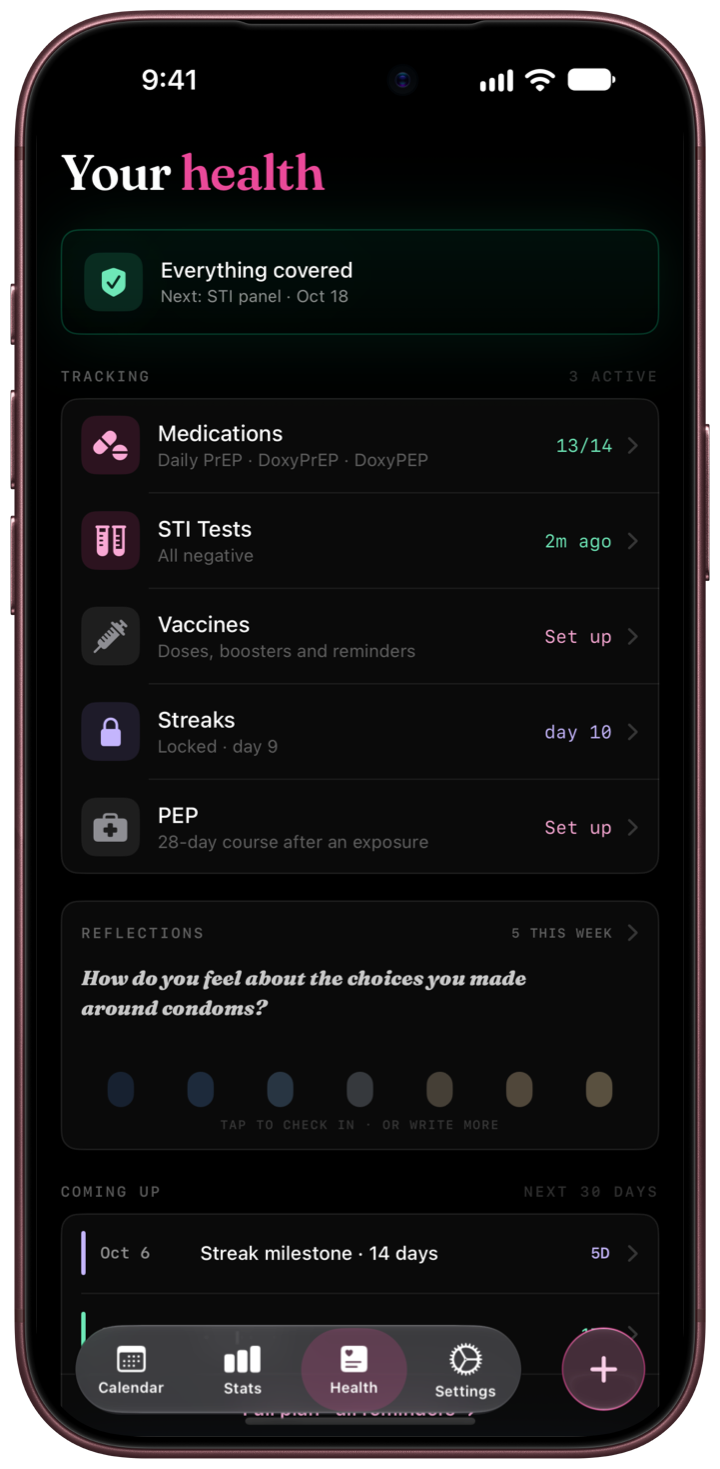
One screen that answers “am I covered?”
Medications, STI tests, vaccinations, PEP and Streaks in a fixed order, each carrying its own status — so you know where you stand without opening anything.
- One thing at a time — the top of the screen shows the single most urgent action across all of them, not a list of everything.
- Coming up — a forward-looking view of the next 30 days: closing windows, scheduled panels, vaccine doses, follow-up tests, milestones.
- One plan — tests, vaccinations and follow-up reminders together in a single list.
- Everything or nothing — turn on only the parts you want to follow. Nothing is mandatory.
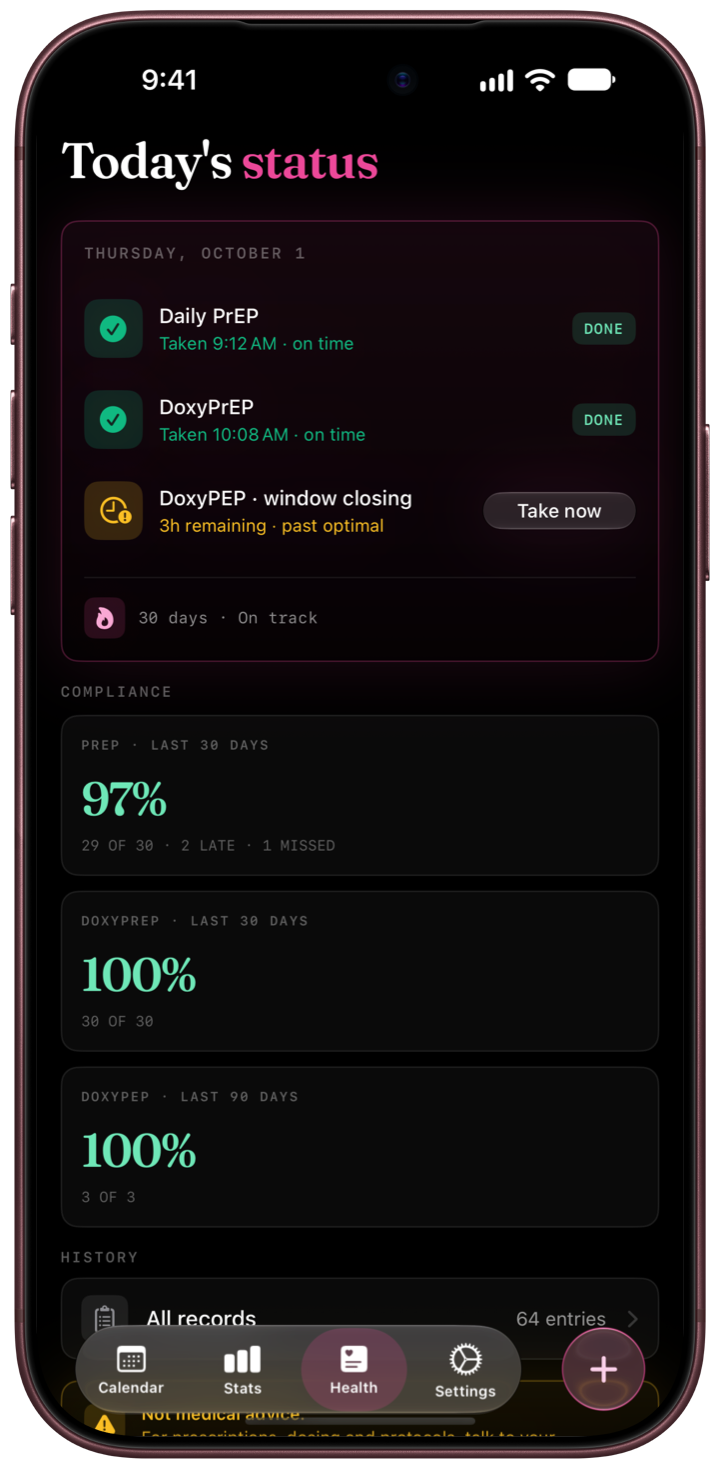
Medications
Your routine, without the nagging.
Candor sends local reminders and keeps track of how you're doing over time. Missing a dose is information, not a verdict.
- Daily PrEP with adherence over 30 days at a glance.
- 2-1-1 event-based PrEP — per-cycle compliance, including the reduced loading dose rule.
- DoxyPEP — the 72-hour post-exposure window with optimal, closing and final prompts.
- DoxyPrEP — scheduled dosing on its own track, separate from post-exposure use.
- Honest endings — “Skipped” and “Not taking” close a day cleanly. No guilt loop.
STI tests
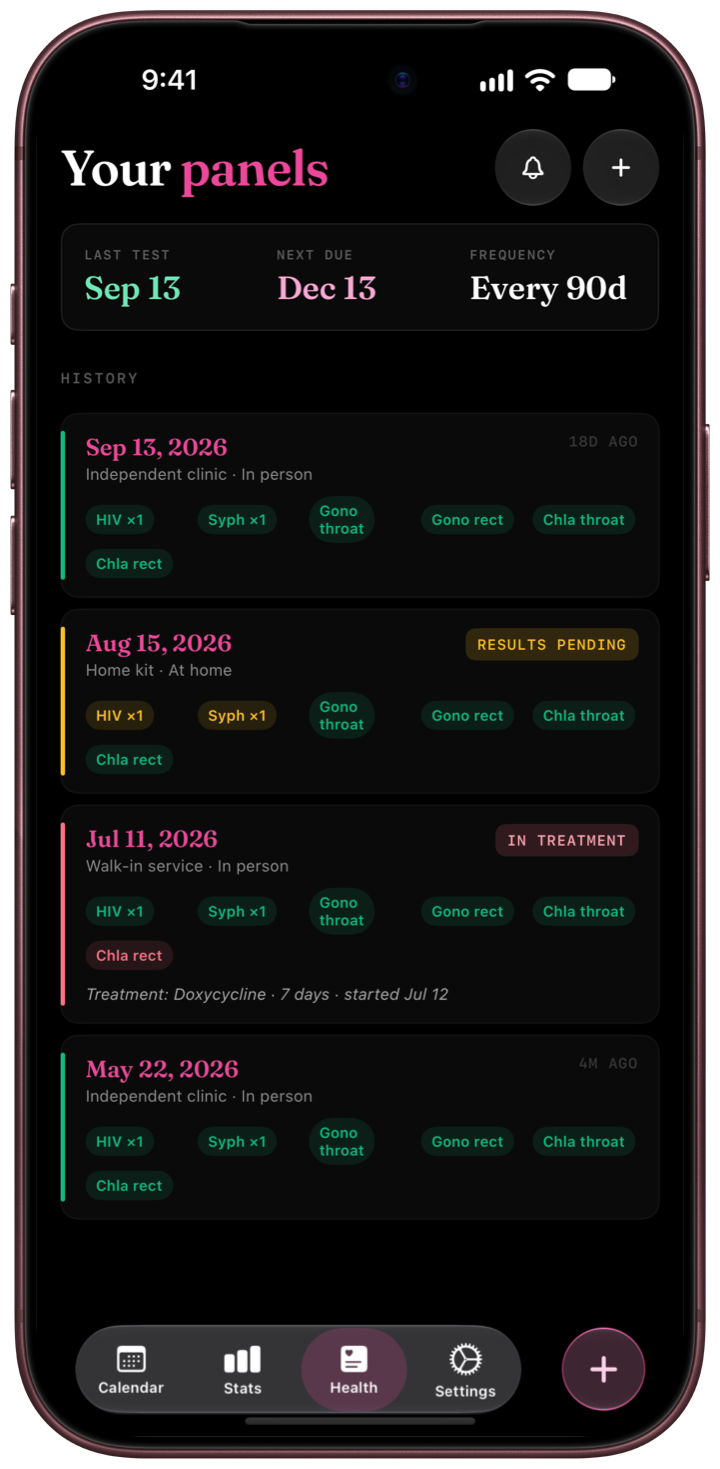
Your results, in your pocket.
A private timeline of every screening — what was tested, at which site, and what came back. Candor reminds you when the next cycle is due.
- Per-site panels — record results the way the lab reports them, including pending ones.
- Cycle reminders — set your own interval; get a nudge before it lapses, not after.
- Context that matters — see how much has happened since your last panel.
- Treatment and retest — track a positive through treatment to the follow-up test.
Stats
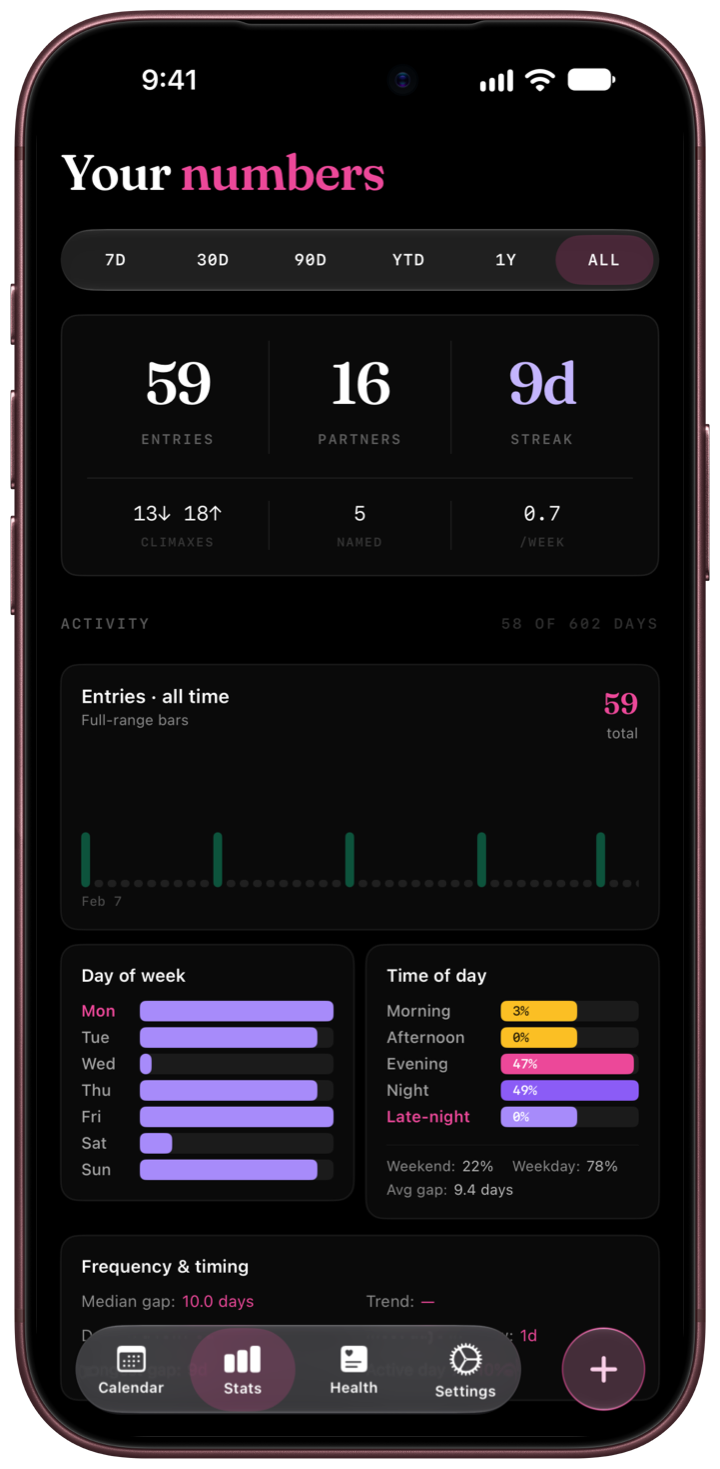
Numbers that are only about you.
Candor turns your entries into your own patterns. No goals to hit, nobody to compare against, nothing shared anywhere.
- Counts — lifetime, yearly and monthly, with partner count kept separately.
- Patterns — practices, roles, venues, time of day, day-of-week rhythm, trends over time.
- Protection and mood — protection over time, mood, places and your year in review.
- Adherence — PrEP, DoxyPEP and DoxyPrEP rates in the same place as everything else.
- Streaks — sessions, current run and personal best, if you use them.
Reflections
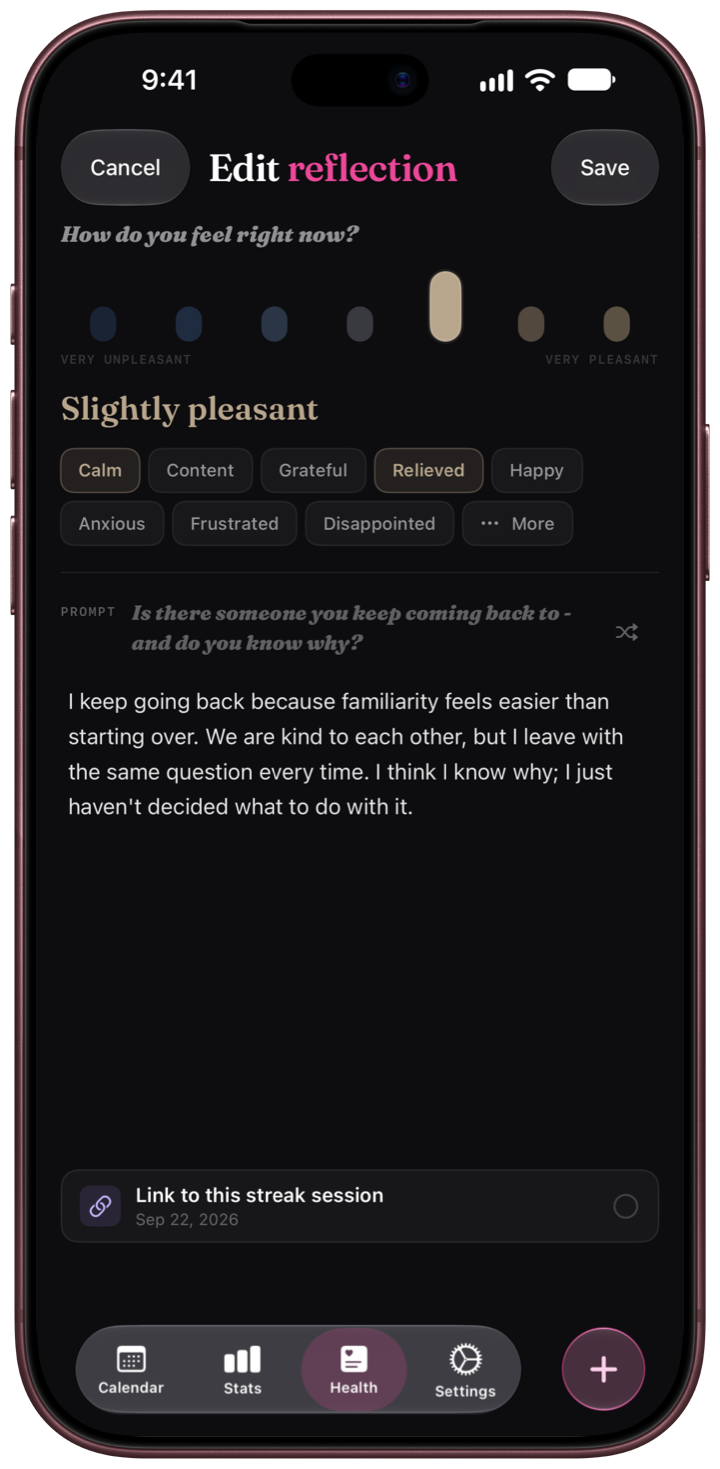
Somewhere to be honest.
A mood rating and a few lines, on the days you feel like it. Prompts cover the things that are actually on your mind — consent, protection decisions, testing anxiety, what a night meant to you.
- Write or skip — reflections are never required and never counted against you.
- Nothing analysed — no sentiment scoring, no insights you didn't ask for.
- Same lock, same rules — protected by Face ID or Touch ID and your PIN like everything else.
- Apple Health, if you want it — ratings and feelings can be saved to Health; what you write stays in Candor.
Every device
One journal, wherever you are.
iPhone, iPad, Mac and Apple Watch. Turn on sync and your journal follows you through your own iCloud — no account, no server of ours in between. One Candor+ subscription covers iPhone, iPad and Mac.
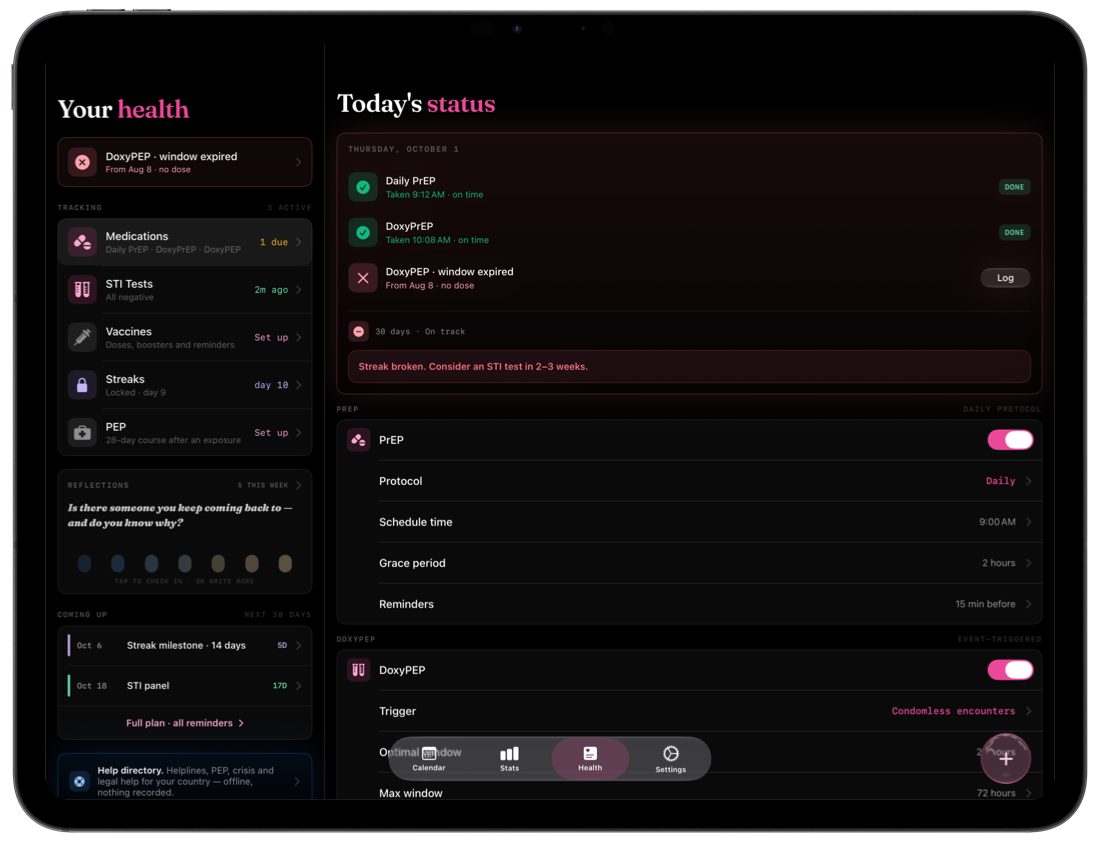
iPad
Room for the whole month.
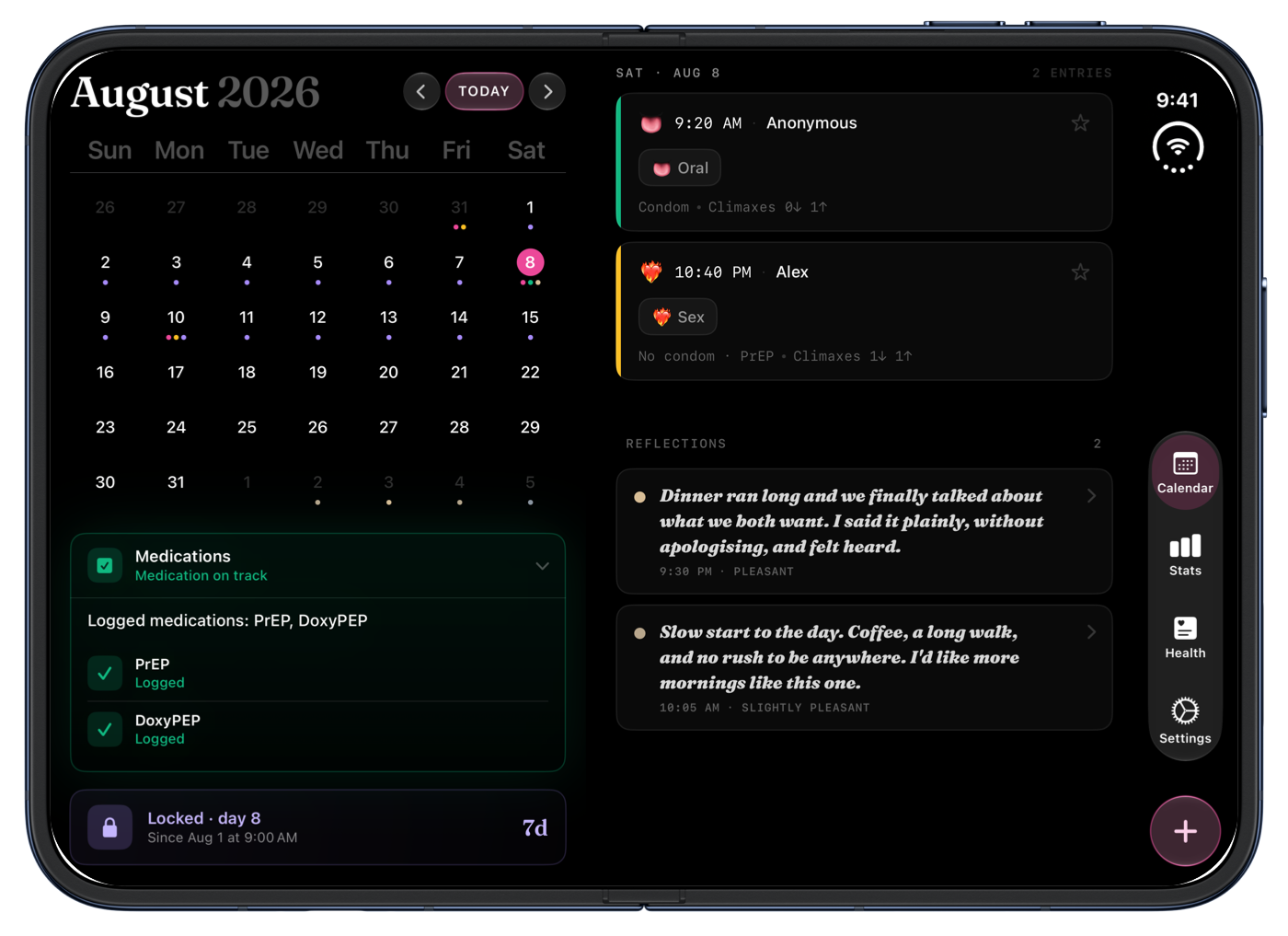
Layouts designed for the larger screen, in portrait and landscape.
- Sidebars — Health sections open beside the overview instead of replacing it.
- More room — for your calendar, entries and statistics side by side.
- Keyboard — ⌘N for a new entry and ⌘1–4 for the sections with a hardware keyboard.
- Same privacy — the same PIN, Face ID or Touch ID, and Panic PIN.
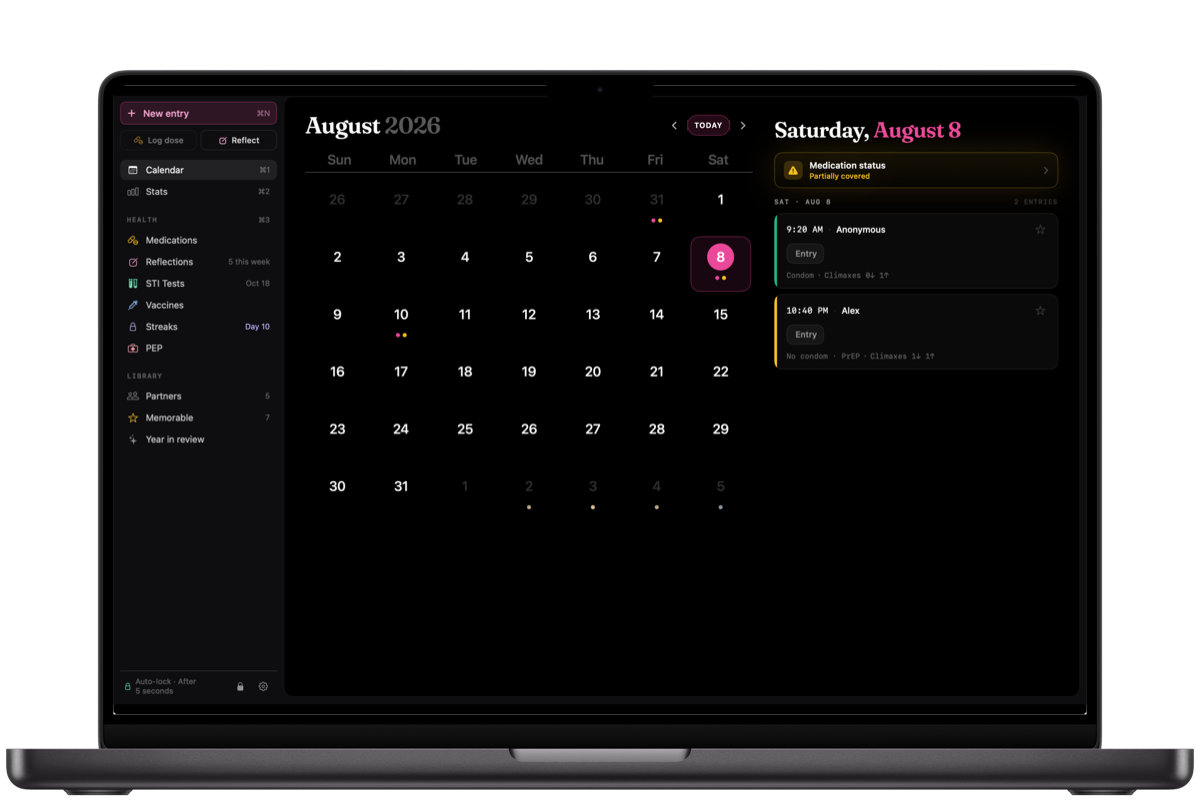
Mac
A native Mac app, not a stretched phone.
Sidebar navigation, keyboard shortcuts and desktop widgets.
- Sidebar — calendar, health sections and statistics one click away, with today's doses always in view.
- Keyboard shortcuts — ⌘N for a new entry, ⌘1–4 to switch sections, ⇧⌘E to export.
- Exports where you work — CSV, PDF reports and backups saved straight to your files.
- Touch ID — the same lock as on your iPhone.
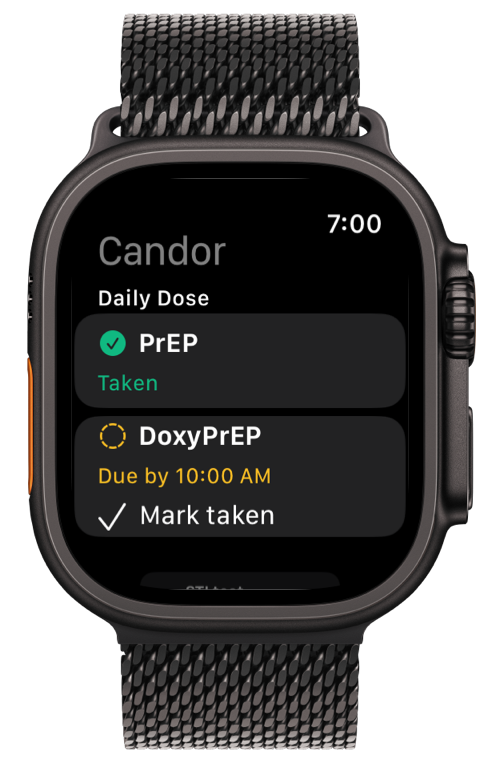
Apple Watch
Today's doses, on your wrist.
A companion to the iPhone app for the moments you don't want to pull out your phone.
- Doses — see what's due today and mark it as taken.
- What's next — your session timer and upcoming tests and vaccinations.
- Complications — add Candor to your watch face.
- Quick entry — when your privacy settings allow it. Neutral labels by default.
Privacy is the architecture
Built so we couldn't read your data if we wanted to.
There is no Candor account, no Candor server and no analytics SDK. Your entries are written to your device's encrypted storage and stay there, unless you choose to sync them through your own iCloud — which belongs to you, not to us.
No cloud servers
The app has no backend. Nothing is uploaded to us, because there is nowhere for it to go.
iCloud sync, your call
Turn it on and your journal syncs between your iPhone, iPad and Mac through your personal iCloud, encrypted by Apple. We never touch it.
No sign-up, ever
No email, no username, no profile. Nothing to leak, nothing to breach, nothing to hand over.
Panic PIN
Set a second PIN. Entering it clears the app's data on the spot — no dialog, no trace, no way back.
Face ID, Touch ID and PIN
Locked by default, locked again the moment you leave. Notification previews, widgets and the Watch stay generic unless you choose otherwise.
No tracking, no ads
No analytics, no fingerprinting, no third-party SDKs, no advertising. The App Store privacy label says the same thing.
None of this is a policy we could quietly change later. There is no server to switch on and no account to attach anything to. Read the full policy.
Frequently asked
Good questions, honest answers.
Does Candor send my data anywhere?
Not to us. There is no Candor server and the app has no backend. Everything you enter is stored on your device. It leaves only when you choose: through iCloud sync you switch on yourself, which goes to your own Apple Account; to your paired Apple Watch; to Apple Health if you enable it; or as a file you export.
Does it work on iPad, Mac and Apple Watch?
Yes. Candor runs on iPhone, iPad and Mac, with a companion app for Apple Watch. With iCloud sync on, your journal is the same on all of them. One subscription covers iPhone, iPad and Mac on the same Apple Account. The Watch app works with Candor on your paired iPhone.
What happens if I lose my phone?
If iCloud sync is on, your data comes back when you set up a new device with the same Apple Account. If it's off, the data is gone with the device — unless you saved a backup file — which, depending on your situation, may be exactly what you want.
Either way the app stays locked behind Face ID and your PIN, so a lost phone doesn't mean an open journal.
What is the Panic PIN?
It's a second PIN you set up next to your normal one. Enter it — under pressure, or because you've decided to — and Candor erases its on-device data immediately and silently. No confirmation, no recovery, and it works even if the app is in a lockout after failed attempts.
Does the app give medical advice?
No. Candor records what you tell it and reminds you about routines you set up. It does not diagnose, treat, prescribe or recommend a course of action. Anything to do with PrEP, DoxyPEP, DoxyPrEP, PEP, vaccinations, testing or treatment should be decided with a qualified healthcare professional.
Can I export my data?
Yes. In Settings → Data → Export & Backup you can export CSV files, create a PDF report for your clinician, or save a full backup — optionally protected with a password — and restore it later. An exported file sits outside the app's protection, so keep it somewhere safe. You can also import an existing log.
How do I delete everything?
Two ways: the in-app Delete all data action, which asks you to type a confirmation and also removes your Candor data from iCloud if sync is on, or simply deleting the app from your home screen — iOS removes all of its data from that device.
How much does it cost?
Candor is an annual subscription: 14 days free, then US$19.99 per year. There's no free tier and no ads — the subscription is the entire business model, which is also why there's no reason to collect anything about you.
How do I cancel?
On your iPhone or iPad: Settings → your name → Subscriptions → Candor → Cancel Subscription. On a Mac: App Store → your name → Account Settings → Subscriptions. Cancel at least 24 hours before your trial or current period ends to avoid the next charge. Cancelling during the trial means you're never charged.
Which languages does it support?
English, German, Spanish (Spain and Latin America), French, Italian, Japanese, Korean, Portuguese (Portugal and Brazil), Russian and Simplified Chinese.
Guides
The things nobody quite tells you.
Plain, sourced answers about testing windows, PrEP and DoxyPEP timing, and what to do after an exposure — written for the people actually having the sex being described.
When a test can actually find it
Window periods for HIV, chlamydia, gonorrhoea, syphilis and hepatitis — and the schedule they imply.
The first 72 hours
PEP and DoxyPEP are the only things with a deadline. Everything after that is a calendar problem.
Why a urine test is not a screen
Throat and rectal infections are usually silent, and a urine sample never looks for them.
Get Candor
Honest tracking. Yours alone.
iPhone and iPad with iOS 26 or later, Mac with macOS 26 or later, Apple Watch with watchOS 26 or later. Ages 18+.

Payment is charged to your Apple Account at the end of the free trial, or at confirmation of purchase if no trial applies. The subscription renews automatically unless cancelled at least 24 hours before the end of the current period. Manage or cancel it in your Apple Account settings. By subscribing you agree to the Terms of Use and the Privacy Policy.